google ai beauty: Which AI Beauty Tools Have Best Reviews? Compare Features & Usability
The best AI beauty tools compared: virtual makeup try-on, skin analysis and shade matching - what each app does best and the free browser tools to start with.

Estimated reading time: 17 min
Key Takeaways
Free tools for this guide (run in your browser, nothing uploaded):
- Virtual makeup try-on (26 looks, free)
- Free AI makeup analysis (undertone, face shape, colour season)
- Searching for google ai beauty or wondering which AI beauty tools have best reviews? Google AI beauty apps and their top-rated alternatives offer instant virtual makeup try-ons, personalized skin analysis, and tailored skincare routines—all powered by advanced AI. User feedback highlights the most accurate, user-friendly, and inclusive options with top usability available today.
- Popular apps like FaceApp, YouCam Makeup, Makeup Check AI, and Google Lens consistently receive strong reviews for makeup generation, color-season analysis, and overall user experience. These are frequently recommended when comparing which AI beauty tools have best reviews.
- Accuracy, privacy, and inclusivity remain key differentiators among free and paid AI beauty tools—user reviews often reveal where each app excels or falls short.
- Google AI beauty tools integrate product recommendations and e-commerce, enabling seamless shopping and step-by-step virtual try-ons from your mobile device.
- Ethical concerns such as AI bias and data security increasingly influence user trust and app reputations in the AI beauty space.
Table of Contents
- Section 1: Overview of Google AI Beauty Tools
- Section 2: Comparison of Top Google AI Beauty Apps (2026)
- Section 3: Virtual Makeup Simulation vs. Skin Analysis Accuracy
- Section 4: Free vs. Paid Google AI Beauty Tools—Features & Limitations
- Section 5: Using Google Lens for Virtual Makeup Try-Ons—Step by Step
- Section 6: AI Beauty Apps, Privacy, and Ethical Considerations
- Conclusion
- FAQ
Section 1: Overview of Google AI Beauty Tools
If you’ve searched for google ai beauty or want to know which AI beauty tools have best reviews, you’ll find that Google AI beauty solutions and their partners lead the way in virtual makeup generation, skin analysis, and custom skincare routines. These tools use advanced AI to scan your face, instantly generate makeup looks, and provide personalized skincare advice. Whether through dedicated apps like FaceApp, YouCam Makeup, Makeup Check AI, or features embedded in Google Lens, you can try new makeup styles, analyze your skin, and get tailored routines—all from your phone. User reviews often highlight accuracy, ease of use, and inclusivity as top reasons for choosing these apps, emphasizing their excellent usability.
Defining Google AI Beauty Tools
Google AI beauty tools encompass a rapidly growing ecosystem of apps and features powered by artificial intelligence to personalize and elevate your beauty routine. Available as standalone apps—such as FaceApp, YouCam Makeup, and Makeup Check AI—or as smart features within Google Lens, these tools let you discover new makeup, generate and try on looks, analyze your skin, and receive personalized skincare tips with a quick scan or selfie. These apps earn high marks for ease of use, accurate makeup overlays, and actionable skin analysis, making them top choices for those seeking the best AI beauty app. If you're wondering which AI beauty tools have best reviews, look for apps with high ratings for inclusivity, realism, usability, and personalized recommendations.
Key Technologies Behind the Magic
- Facial Recognition & Landmark Detection: Pinpoints facial features for precise makeup simulation and skin analysis.
- Computer Vision: Analyzes skin texture, tone, and blemishes to deliver actionable skincare recommendations.
- Augmented Reality (AR): Overlays realistic makeup effects in real time for instant try-ons and tutorials.
- Machine Learning: Learns from user data to suggest personalized routines, color matches, and recommended products.
Why 2026 Is a Landmark Year
By 2026, AI beauty apps are more than just fun filters—they deliver dermatology-grade skin reports, connect users to e-commerce, and build daily routines. Google’s AI advances, along with its partnerships, have made beauty tech more accessible and accurate for every skin type and tone, while user reviews and ratings increasingly drive improvements and transparency. If you're comparing which AI beauty tools have the best reviews, these new features and integrations are key reasons for their popularity among users.
Section 2: Comparison of Top Google AI Beauty Apps (2026)
To determine which AI beauty tools have best reviews, we compared the top google ai beauty apps based on user ratings, features, and feedback. Here’s what stands out in 2026:
FaceApp: Aging, Makeup, and Beyond
FaceApp remains a favorite for its realistic aging simulations and makeup filters. Its AI models generate natural-looking makeup—lipstick, contour, eye shadow—tailored to your unique facial structure. Recent updates include expanded skin tone options and a more inclusive makeup palette, addressing bias concerns from reviewers.
- Strengths: Realistic virtual transformations, easy-to-use interface. Highly reviewed for makeup realism and fun filters.
- Weaknesses: Limited in-depth skin analysis; most advanced features require a subscription.
YouCam Makeup: Real-Time Try-Ons & Skin Analysis
YouCam Makeup is top-rated for both virtual try-ons and skin analysis. Its AR technology enables accurate try-ons, supporting over 3000 makeup products from global brands. The skin diagnostic tool uses AI to assess skin health (hydration, spots, wrinkles) and recommends routines or products tailored to your face. E-commerce integration makes purchasing products you try virtually seamless. For a deeper understanding of preparing your skin before makeup application, see our detailed non-comedogenic exfoliating acids primer makeup: Step-by-Step Prep for Flawless Skin guide.
- Strengths: Huge product database, precise AR makeup, actionable skin analysis. Consistently among the best-reviewed AI beauty apps.
- Weaknesses: Some features require payment; occasional lag on older devices.
Google Lens: Everyday AI Beauty Assistant
Google Lens isn’t a dedicated beauty app, but its google ai beauty features are robust in 2026. Scan your face or a product, and Lens identifies makeup styles, suggests matching products, and links to tutorials or similar looks. Its seamless integration with Google Search and Shopping bridges discovery and purchase for beauty products. User reviews praise its convenience and accessibility, especially for quick product matches. For those interested in exploring virtual makeup try-ons with AI and AR tools, our post on Virtual Makeup Try On: Instantly Try Any Look with AI & AR Tools offers an excellent overview.
- Strengths: Free, integrated with Google’s ecosystem, instant product matching. Well-reviewed for convenience and accessibility.
- Weaknesses: Makeup simulation less advanced than FaceApp or YouCam; relies on third-party content for tutorials.
Emerging Players and Specialized Apps
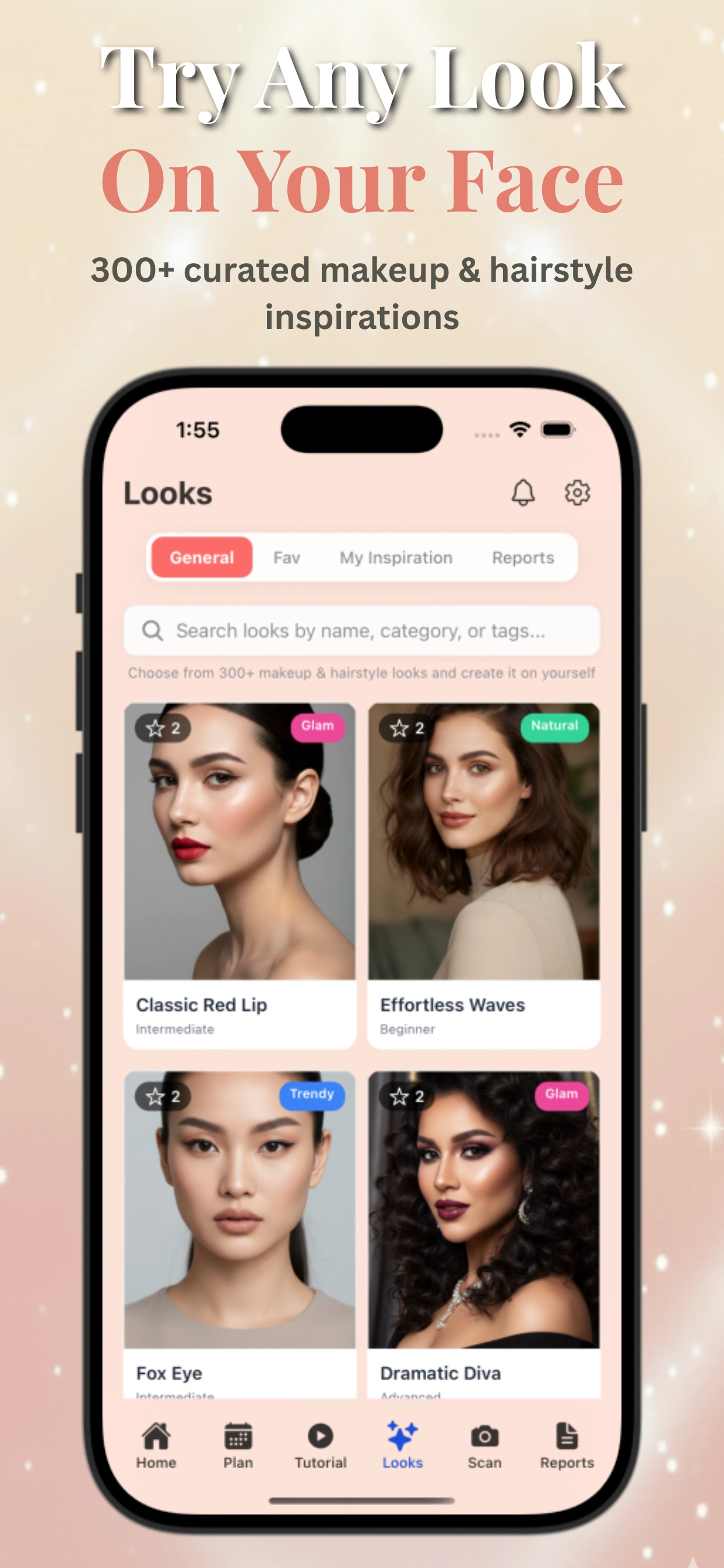
- Makeup Check AI: Noted for its comprehensive AI-powered beauty team—24 reports covering makeup, skincare, and fashion, with 300+ looks and 100+ tutorials. Its deep personalization and AI chat assistant set a new industry benchmark. Try Makeup Check AI for a holistic, data-driven approach. User reviews praise its detailed color-season analysis, high accuracy for matching foundation and contour, and the ability to generate personalized routines. It also scores highly for usability and detailed guidance, making it a top choice for users seeking the best-reviewed AI beauty tools.
- Others (Perfect365, ModiFace, etc.): Specialized in quick AR makeovers, but lack advanced analytics or daily routines.
Section 3: Virtual Makeup Simulation vs. Skin Analysis Accuracy
For those searching which AI beauty tools have best reviews or google ai beauty, realism, accuracy, and usability are the top concerns for users and reviewers. Highly rated apps deliver natural, believable results and actionable advice for real skin concerns. Many users specifically mention the value of seeing personalized results that match their unique skin tone and face shape, a key factor in positive reviews for AI beauty apps.
How Realistic Are AI Makeup Try-Ons?
Modern AI makeup apps combine facial mapping and AR to overlay virtual cosmetics with impressive realism. The best tools—like YouCam Makeup and FaceApp—render lipstick, foundation, and contour that adapt to facial movements and different lighting. Realism depends on:
- Lighting conditions during scanning (bright, even light yields best results)
- Camera quality (higher resolution means more accurate overlays)
- Skin tone and facial features (apps are improving but may still struggle with non-standard lighting or unique features)
User tests show that professional-grade apps now achieve 80–90% realism, fooling the casual observer in many cases. For more, see our in-depth look at virtual beauty transformations.
AI Skin Analysis: How Precise Is It?
AI skin analysis tools use computer vision to evaluate parameters like:
- Texture and pores
- Hydration and oiliness
- Wrinkles, spots, and redness
Apps such as YouCam Makeup and Makeup Check AI leverage large training datasets to increase accuracy. Dermatologists note that while these tools are not replacements for clinical exams, they offer surprisingly close estimates—within 10–15% of professional readings for many skin attributes. Still, lighting and camera quality can introduce errors, especially for deeper or subtler skin issues. User reviews often mention the convenience of instant skin analysis and personalized recommendations, which drives higher ratings for these AI beauty apps. When comparing which AI beauty tools have best reviews, look for feedback on the precision, usability, and usefulness of their skin analysis features.
Before/After Results and User Reviews
Most user reviews highlight the motivational power of seeing before/after images. Many apps now allow users to track changes over weeks or months, aiding in both confidence and habit-building. However, a common complaint remains: results can look less natural on darker skin tones or with unconventional makeup styles. Ongoing AI training is addressing these gaps for more inclusive results. If you want to know which AI beauty tools have best reviews, pay attention to feedback on inclusivity, accuracy, and usability across all skin types.
Section 4: Free vs. Paid Google AI Beauty Tools—Features & Limitations
Reviewers often compare free vs. paid features when searching which AI beauty tools have best reviews. Free Google AI beauty tools typically offer basic virtual makeup try-ons, color analysis, and limited skin diagnostics. Paid versions unlock advanced skin health reports, personalized skincare routines, and expanded product recommendations. For example, Makeup Check AI provides 24 detailed AI beauty reports and over 300 looks in its premium tier, while still offering a robust free experience. Users appreciate free tools for quick experimentation but often upgrade for deeper personalization and routine building.
When evaluating usability, free apps score high for accessibility and instant results, whereas paid apps offer richer guidance and ongoing support. User reviews suggest that the best-reviewed AI beauty tools balance free features with premium upgrades to meet diverse needs.
Section 5: Using Google Lens for Virtual Makeup Try-Ons—Step by Step
Google Lens integrates AI beauty features that let you quickly try on makeup looks or identify products using your phone camera. To use Google Lens for virtual makeup try-ons:
- Open the Google Lens app or access Lens via Google Photos.
- Tap the camera icon and point it at your face or a makeup product.
- Lens recognizes makeup styles and suggests similar looks or tutorials.
- Use integrated shopping links to explore and purchase recommended products.
This seamless experience makes Google Lens a convenient AI beauty tool with top usability, especially for users who want quick product matches and inspiration without installing dedicated apps.
Section 6: AI Beauty Apps, Privacy, and Ethical Considerations
As AI beauty tools grow in popularity, users increasingly evaluate apps based on privacy policies and ethical AI use. Top-reviewed AI beauty apps clearly disclose data usage, avoid biased training data, and promote inclusivity across skin tones and types. Google AI beauty tools and apps like Makeup Check AI prioritize user consent and secure data handling, which contributes to their strong reputations. When choosing which AI beauty tools have best reviews, consider transparency, ethical AI practices, and community feedback to ensure a trustworthy experience.
Conclusion
Searching for google ai beauty or wondering which AI beauty tools have best reviews? The best AI beauty apps combine advanced virtual makeup try-ons, precise skin analysis, and personalized skincare routines with strong usability and ethical standards. Popular options like Makeup Check AI, YouCam Makeup, FaceApp, and Google Lens each offer unique strengths. User reviews consistently highlight accuracy, inclusivity, and ease of use as key factors. Try free tools first to experience their features, then consider premium upgrades for deeper personalization.
FAQ
Which AI beauty tools have best reviews for usability?
Apps like Makeup Check AI, YouCam Makeup, and FaceApp consistently receive top user ratings for usability due to their intuitive interfaces, accurate makeup try-ons, and actionable skin analysis. Google Lens is praised for convenience and quick product matching.
What features make an AI beauty tool highly rated?
Highly rated AI beauty tools offer realistic virtual makeup try-ons, precise skin analysis, personalized skincare routines, inclusivity across skin tones, strong privacy policies, and seamless e-commerce integration.
Are free AI beauty tools effective?
Yes, free AI beauty tools provide valuable features such as virtual makeup try-on and basic skin analysis. However, paid versions often unlock more detailed reports, personalized routines, and expanded product recommendations.
How does Makeup Check AI stand out among AI beauty tools?
Makeup Check AI offers comprehensive AI-powered beauty reports, over 300 makeup looks, personalized skincare routines, and an AI chat assistant. It scores highly in user reviews for accuracy, usability, and detailed color-season analysis.